DigitalB Support DigitalB Support

  • Support
  • FAQ
  • Knowledge Base
  • Instructions
  • Videos
  • Contact Us
  • Sign In
Home / Account / How do I reset my password?

How do I reset my password?

2151 views Less than a minute 0
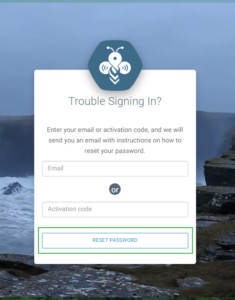
From a web browser, go to portal.digitalb.net and locate
Click “Need help signing in?”
  • Enter your email address or your device’s activation code beginning with “H-.”  Example: H-12345678.
  • An email will be sent to give you access to reset the password. Be sure to check your spam or junk folder if you don’t see the email right away.
  • Click on the link to reset your password.
Your new password will be ready and usable immediately.
Account

Related Articles

  • How do I add a logo to my menu?
  • How do I download files to my device?
  • How do I change the name of my device?
  • How do I make an online account?

Categories

  • 10Account
  • 3Content
  • 7General
  • 2Getting Started
  • 10Hardware
  • 1Reseller
  • 6Setup

Most Viewed

  • Setup Instructions 3440
  • Getting Started Guide 2928
  • What does “local playback” mean? 2564
  • Where is my activation code? 2539
  • How do I connect to WiFi? 2275

Popular Articles

  • Setup Instructions
  • Getting Started Guide
  • What does “local playback” mean?
  • Where is my activation code?
  • How do I connect to WiFi?

Article Categories

Account Content General Getting Started Hardware Reseller Setup

Contact Us

If you need to submit a support ticket, please log in to portal.digitalb.net.

If you cannot log in or access your account, please try to reset your password here, or send an email to support@digitalb.net.

© 2018 DigitalB